

Best Expense-Tracking Apps for Couples: Features, Privacy, and Cost

Couples share meals, rent, and streaming passwords. Sharing a clear view of spending is harder. One partner may track every coffee. The other may prefer a high-level monthly check-in. An expense-tracking app can bridge those styles, but only if the features, privacy settings, and cost match how you actually live.
This review-style guide explains what couples should look for, how privacy tradeoffs work, and how to think about free versus paid plans. It does not rank a permanent winner, because the best app depends on your banks, your comfort with data sharing, and whether you need deep budgeting or simple visibility.
Think of the app as a communication aid first and a spreadsheet replacement second. Couples who pick tools only for charts often abandon them. Couples who pick tools that support a short, calm weekly conversation tend to stick with them.
Start with the problem you are trying to solve
Some couples need fraud and duplicate-subscription detection. Others need a fair split of shared bills while keeping personal spending private. Others want envelope-style budgets that both people can update on their phones. Define the job before you compare brand names.
Write down your must-haves. Examples include shared household categories, separate personal categories, bank connectivity, manual entry offline, receipt capture, and a weekly summary both of you will actually read. If an app cannot do the job you named, its other features do not matter.
Also write down your deal-breakers. Common ones include mandatory public feeds of every purchase, no partner seats on the free plan, weak export tools, or no multi-factor authentication.
Core features that matter for two people
Shared access with roles is foundational. You should be able to invite a partner without sharing a single login password. Better tools let you decide which accounts are visible to both people and which remain personal.
Category rules save time. If grocery stores always map to the same category, you spend less energy arguing about mislabels. Look for split transactions when one purchase includes household and personal items.
Recurring bill detection helps couples spot rent, utilities, and subscriptions quickly. Net-worth views are optional for early stages. Cash-flow visibility usually matters more than investment tracking when the goal is reducing money conflict.
Mobile quality counts because couples update budgets in short moments between work and chores. If the app is clumsy on a phone, it will not survive the first busy month.
Notifications should be useful, not noisy. A ping for every small purchase can create tension. A weekly digest or threshold-based alert is often healthier for relationships.
Privacy and data-sharing questions to ask
Expense apps often connect to banks through data aggregators. That convenience comes with permissions. Read whether credentials are stored, how connections are secured, and what happens if you disconnect an account.
Decide your household privacy model. Full transparency can build trust for some couples. Others prefer a shared pot for bills plus private personal spending allowances. A good app supports the model you choose rather than forcing total surveillance.
Check export options. You should be able to download your transactions if you leave. Also review the vendor's policy on selling data, using data for advertising, and responding to breaches. No company is perfect, but opaque policies are a warning.
Use strong unique passwords and multi-factor authentication on the tracking app and on email. An expense app can become a map of your financial life. Protect it like a bank login.
If one partner has experienced financial control or abuse in a past relationship, prioritize tools and ground rules that protect autonomy. Shared finance should be collaborative, not coercive.
Cost: free tiers, subscriptions, and hidden time costs
Free plans may limit connected accounts, historical data, or partner seats. Paid plans often unlock investment tracking, deeper reports, or priority syncing. Price the annual cost against the money fights or missed bills you are trying to prevent.
Remember the time cost. An app that requires constant manual receipt scanning may be free in dollars and expensive in attention. Couples stick with tools that match the least motivated partner's patience level.
Avoid paying for features you will not use. If you only need shared categories and a monthly review, a lightweight tool can beat a complex finance suite.
Annual billing discounts are worthwhile only if you already finished a trial and both partners used the app without nagging. Do not prepay for a tool you have not stress-tested during a busy week.
Approaches couples commonly choose
All-in-one budget apps suit partners who want envelopes, goals, and proactive planning. They work best when both people agree to a weekly ritual. Transaction trackers with bank sync suit partners who want visibility first and budgets second.
Spreadsheets remain a strong contender for privacy-conscious couples willing to do light data entry. They are not glamorous, but they keep data under your control. Hybrid setups are common: cards and banks for payments, a simple shared sheet for the monthly meeting.
Payment-split apps help roommates and couples who share some bills but not all accounts. They are weaker as full budgeting systems but excellent for fairness on shared expenses.
Some couples use one partner as the bookkeeper with scheduled review rights for the other. That can work if both consent and the bookkeeper does not become a gatekeeper. Rotate the role occasionally so knowledge does not concentrate in one person.
A fair household workflow that apps should support
Agree on shared categories: rent or mortgage, utilities, groceries, transportation, insurance, childcare, and joint savings transfers. Agree on personal categories that do not need commentary if they stay within an allowance.
Hold a short weekly review. Fifteen minutes beats a tense monthly autopsy. Look at progress toward bills, unusual charges, and upcoming large expenses. Use the app as the agenda so the conversation stays specific.
Automate shared bills from a joint account funded by agreed contributions. Tracking then confirms reality instead of becoming the only control system.
When a category overruns, ask what changed before assigning blame. Price spikes, guests, medical needs, and seasonal costs are not character flaws. The app should surface facts that lead to adjustments, not trials.
How to evaluate an app in a two-week trial
Connect or manually enter two weeks of real spending. Invite your partner. Try splitting a transaction. Export a report. Disconnect an account and see whether the process is clear. If any of those steps feel confusing, keep testing alternatives.
Notice emotional reactions. If one partner feels monitored rather than informed, adjust privacy settings or choose a different structure. Tools should reduce conflict, not create a scorekeeping war.
Test customer support with a simple question during the trial if you can. Slow or generic support is a preview of how account issues will feel later.
Security hygiene for shared finance tools
Prefer apps that support multi-factor authentication. Review connected-app permissions at your bank. Remove old aggregators you no longer use. When a relationship ends, revoke access promptly and change passwords.
Be cautious with screenshots of balances shared in group chats. Use the app's own partner access instead of sending statement photos through insecure channels.
On shared phones or family devices, require app locks. A finance app left open on a tablet is an unnecessary exposure.
Choosing without endless comparison shopping
Pick two finalists that meet your must-haves. Trial both. Choose the one you both opened without reminders. Consistency beats feature count.
Revisit the choice after three months. If you are not using half the features, downgrade or switch. Couples' needs change after a move, a new baby, or a shift to self-employment.
The best expense-tracking app for couples is the one that makes shared money easier to discuss, protects personal boundaries you both respect, and does not cost more than the clarity it provides. Features matter. Privacy matters. Cost matters. Fit matters most.
If you cannot agree on an app, agree on a process first: a weekly 15-minute review, a shared bill account, and personal allowances. Then pick the lightest tool that supports that process. The process is the product. The app is only the container.
Feature checklist you can take into a trial
Can both partners log in separately? Can you hide personal accounts? Can you split a single store run across categories? Can you mark a bill as shared recurring? Can you export CSV or PDF for a year of data? Can you turn off noisy alerts while keeping large-transaction warnings?
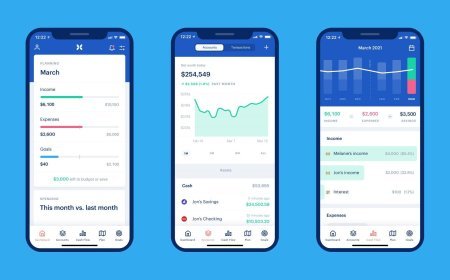
If an app fails two or more of those checks, it is probably a poor fit for couples even if it looks polished in advertisements. Marketing screenshots emphasize dashboards. Daily life emphasizes quick edits and low friction.
Money personalities and how apps can respect them
Detailed trackers may overwhelm a partner who thinks in monthly totals. High-level dashboards may frustrate a partner who wants transaction-level clarity. Look for views that can toggle between summary and detail so each person can enter through their preferred lens.
Agree that curiosity is allowed and interrogation is not. An app should not become a cross-examination device. If a personal allowance category is within budget, it does not need a debate. Reserve deep dives for shared goals and shared bills.
For engaged or newly cohabiting couples, start simpler than you think you need. A joint bill account plus a basic shared tracker beats a complex system you abandon in six weeks. You can always add sophistication after the habit exists.
When to skip apps and use a lighter system
If both of you dislike phone finance tools, a monthly shared spreadsheet and calendar bill reminders may outperform an unused premium subscription. The scorecard is reduced confusion and fewer missed obligations, not whether your stack looks modern.
If bank connectivity is unreliable for your institutions, manual entry or weekly CSV imports can be more accurate than a sync that constantly breaks. Broken sync erodes trust in the numbers and restarts arguments about whose figures are right.
Finally, remember that no expense app replaces emergency savings, clear account ownership, and estate basics like beneficiaries. Tracking is a visibility layer. Solvency still depends on earning, spending less than you earn, and preparing for shocks.
A sample first-month setup
Week one: connect only the joint bill account and one shared spending card, or enter those transactions manually. Week two: add personal allowances as separate categories. Week three: turn on recurring bill detection and clean mislabeled merchants. Week four: hold the first full monthly review using an exported summary.
Keep the setup sequence slow. Dumping every account into a new app on day one creates categorization chaos and early frustration. A staged setup produces cleaner data and a fairer test of whether the tool fits both of you.
If after a month one partner still refuses to open the app, solve the participation problem before buying a higher tier. Paying more will not create buy-in. Revisiting goals, privacy boundaries, and meeting length usually will.
Frequently Asked Questions
What's Your Reaction?
 Like
0
Like
0
 Dislike
0
Dislike
0
 Love
0
Love
0
 Funny
0
Funny
0
 Wow
0
Wow
0
 Sad
0
Sad
0
 Angry
0
Angry
0

Shula is an experienced content writer with a strong background in developing engaging and informative articles. She has written across diverse topics, including personal finance, lifestyle, food, and travel. With a clear and adaptable writing style, Shula brings value by making complex subjects accessible to a broad audience.














Comments (0)